
Building MakeMyDocsBot
MakeMyDocsBot is a smart documentation synchronization bot designed to help maintainers keep multi-language documentation up-to-date across feature branches.

I recently participated in the CrewAI Fall Agentic AI Challenge 2025 and secured 3rd place. This blog captures my end-to-end journey of building MakeMyDocsBot—from breaking down the problem into smaller, manageable sub-problems to designing agents and tools that each tackle a specific challenge.
Here’s a NotebookLM-generated video summary that walks through this blog. It’s a great starting point to understand the overall flow and key ideas
Table of Content
What is MakeMyDocsBot?
Breaking the Problem into Sub-Problems
Agents in MakeMyDocsBot
Building individual agents
Understanding Indexing
Documentation Change Analyzer
Korean Translator Agent / Portuguese (Brazil) Translator Agent
File Content Editor and Git Commit Agent
Index Mapping Specialist / Index Mapping Fixer
Async Processing Across Changed Files
Final Note
What is MakeMyDocsBot?
MakeMyDocsBot is a smart documentation synchronization bot designed to help maintainers keep multi-language documentation up-to-date across feature branches.
Built using crewAI, for crewai (currently) it automates the process of detecting documentation changes in English and synchronizing them into other supported languages — currently Korean and Portuguese (Brazil).
The bot integrates seamlessly into existing workflows, keeping new features consistently documented across all supported locales, reducing manual effort, improving release quality, and scaling easily to new languages by simply adding another agent to the workflow.
Breaking the Problem into Sub-Problems
At this point, we are clear on the goal: capture changes made in the source language (English) and apply those same changes—after translation—to the corresponding documentation files in other languages (such as Portuguese and Korean).
To achieve this, we need to deeply understand the information required at each stage of the process. This is a crucial step, because each sub-problem will be handled by a dedicated agent, which will enrich the context and pass it along to the next agent in the pipeline.
Specifically, we need to answer the following questions:
Which files were modified in the English repository?
What exact lines or sections changed within each file?
Which corresponding files exist in the other language documentation?
How should the identified changes be translated?
Where exactly should the translated changes be applied in the mapped files (what to add, update, or remove)?
Once we can reliably answer each of these questions, we’ll have all the building blocks needed to implement MakeMyDocsBot.
For simplicity, we’ll start by assuming a scenario where only a single file is changed in the English repository. This implies that only one corresponding file in the Korean and Portuguese (Brazil) repositories also needs to be updated.
Once this flow is validated, scaling the system to handle multiple file changes is straightforward—requiring only a small configuration change to run all crew agents asynchronously.
Identifying which particular files are changed in the English Repository can easily be done with Git and some python code.
Check these lines of code here, to know more about this. This solves our 1st problem of identifying which files actually changed in the English repository.
Agents in MakeMyDocsBot
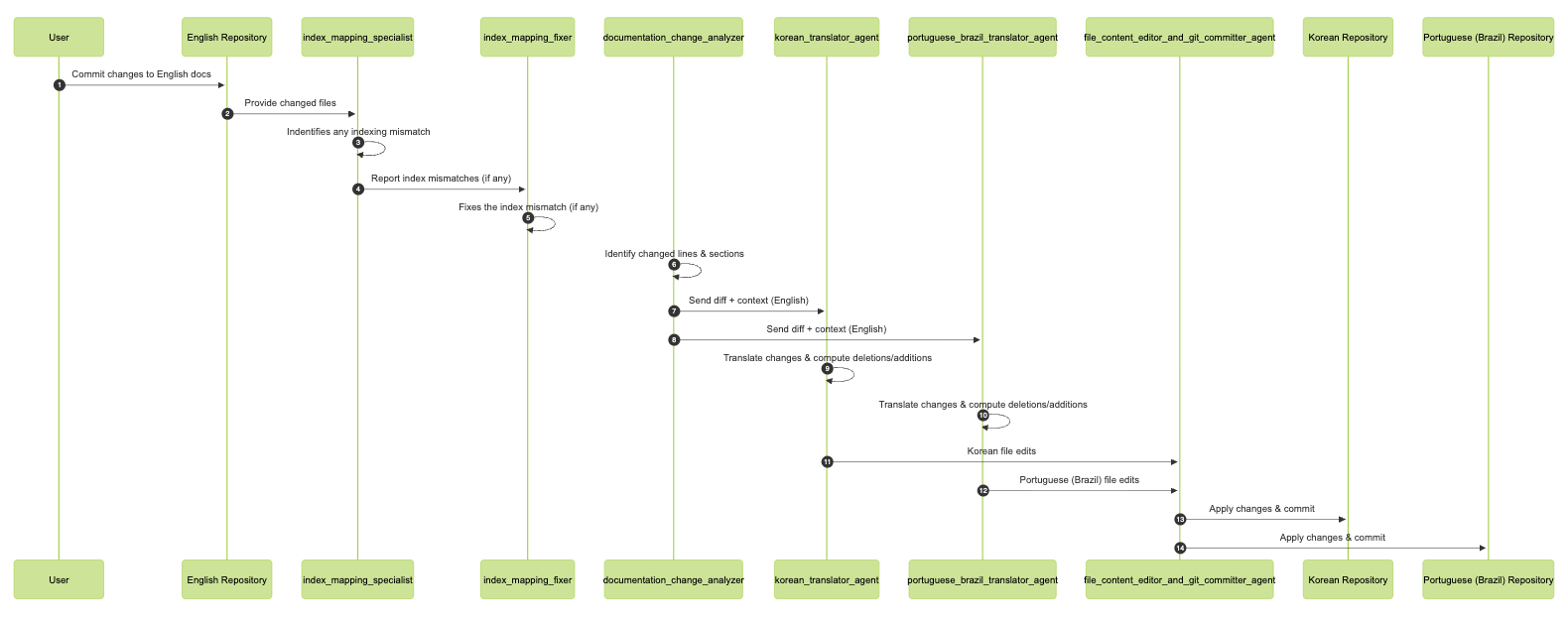
Let’s walk through the agents that collectively power MakeMyDocsBot and understand how each contributes to the end-to-end workflow.
index_mapping_specialist: Checks for index or structural discrepancies between the updated English documentation and the corresponding files in the Korean and Portuguese (Brazil) repositories.
index_mapping_fixer: Addresses and corrects any index mismatches or structural issues detected by the index_mapping_specialist, ensuring all language versions remain properly aligned.
documentation_change_analyzer: Pinpoints the exact sections and line-level changes in the English documentation. Rather than translating the entire file, this agent extracts only the specific subsections that require translation, making the process efficient.
korean_translator_agent: Translates the identified changes into Korean and determines which existing lines should be removed and what new content should be inserted in the target file.
portuguese_brazil_translator_agent: Mirrors the behavior of the Korean translator agent, but produces translations in Portuguese (Brazil).
file_content_editor_and_git_commiter_agent: Applies the translated updates to the respective Korean and Portuguese (Brazil) files and creates the corresponding Git commits on the user’s behalf.
Building individual agents
We’ll take a deep dive into how each agent is configured and how they collectively address the core challenges outlined earlier.
Problems to Solve
What specific lines or sections were changed within each file?
Which corresponding files exist in the other language documentation repositories?
How should the identified changes be translated?
Where exactly should the translated content be applied in the mapped files—what needs to be added, updated, or removed?
Important Note
In the initial architecture, the Index Mapping Specialist and Index Mapping Fixer were not part of the design. They were introduced later after uncovering a critical edge case that disrupted the workflow of the other agents, making their inclusion essential.
Design Approach
We’ll begin by designing the following agents, and then return to the design of the Index Mapping components:
Documentation Change Analyzer
Korean Translator Agent
Portuguese (Brazil) Translator Agent
File Content Editor and Git Commit Agent
After that, we’ll cover:
Index Mapping Specialist
Index Mapping Fixer
Before diving into these components, it’s important to first understand how indexing is performed. This is a crucial part of the architecture, as it provides the most relevant context that is passed downstream to all subsequent agents.
Understanding Indexing
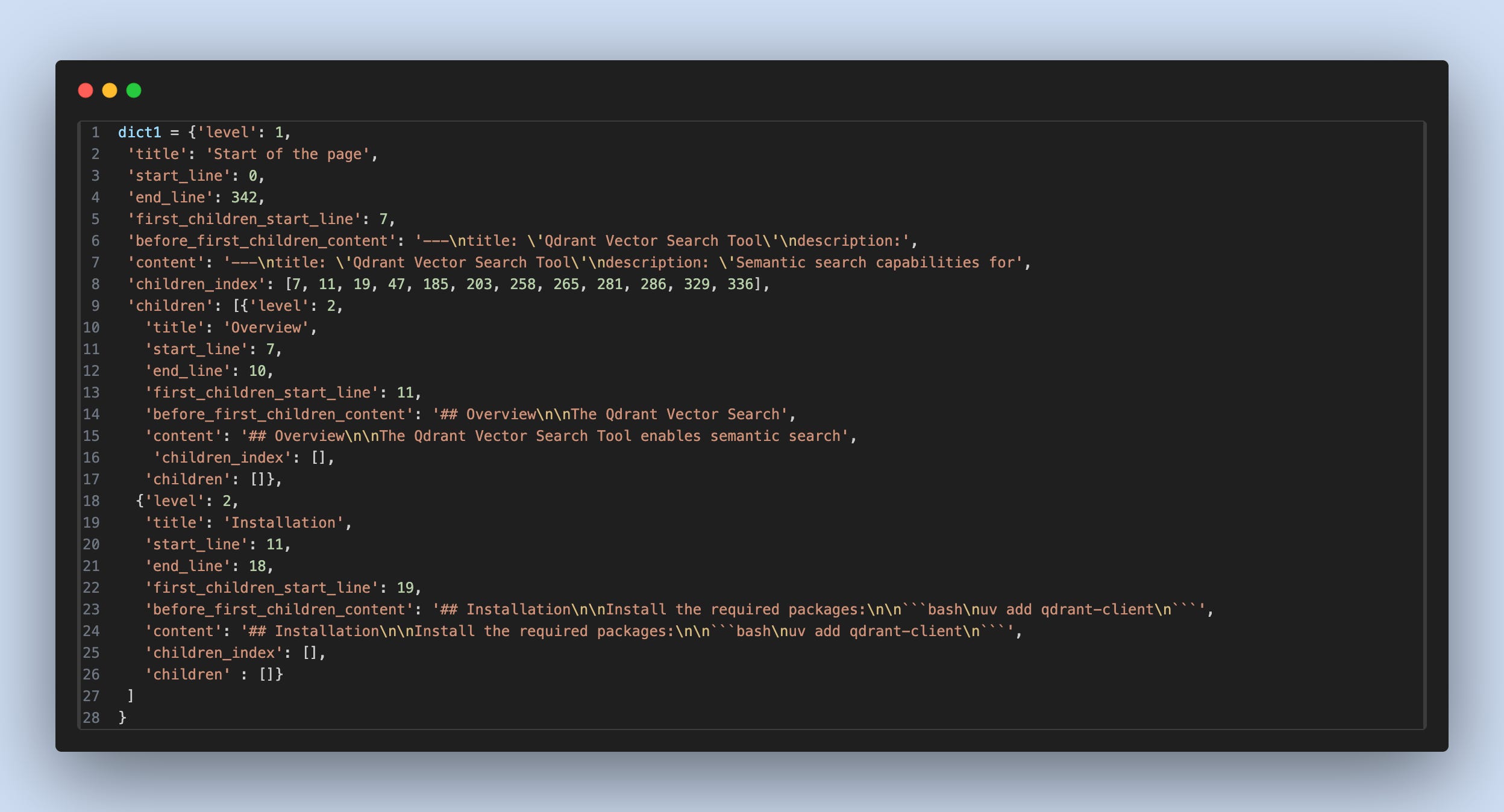
I am not going deep dive into the codebase, just wanted to show how the indexing metadata looks like.
This is the output you will see will be DocNode class, with list of DocNode class in the children list.
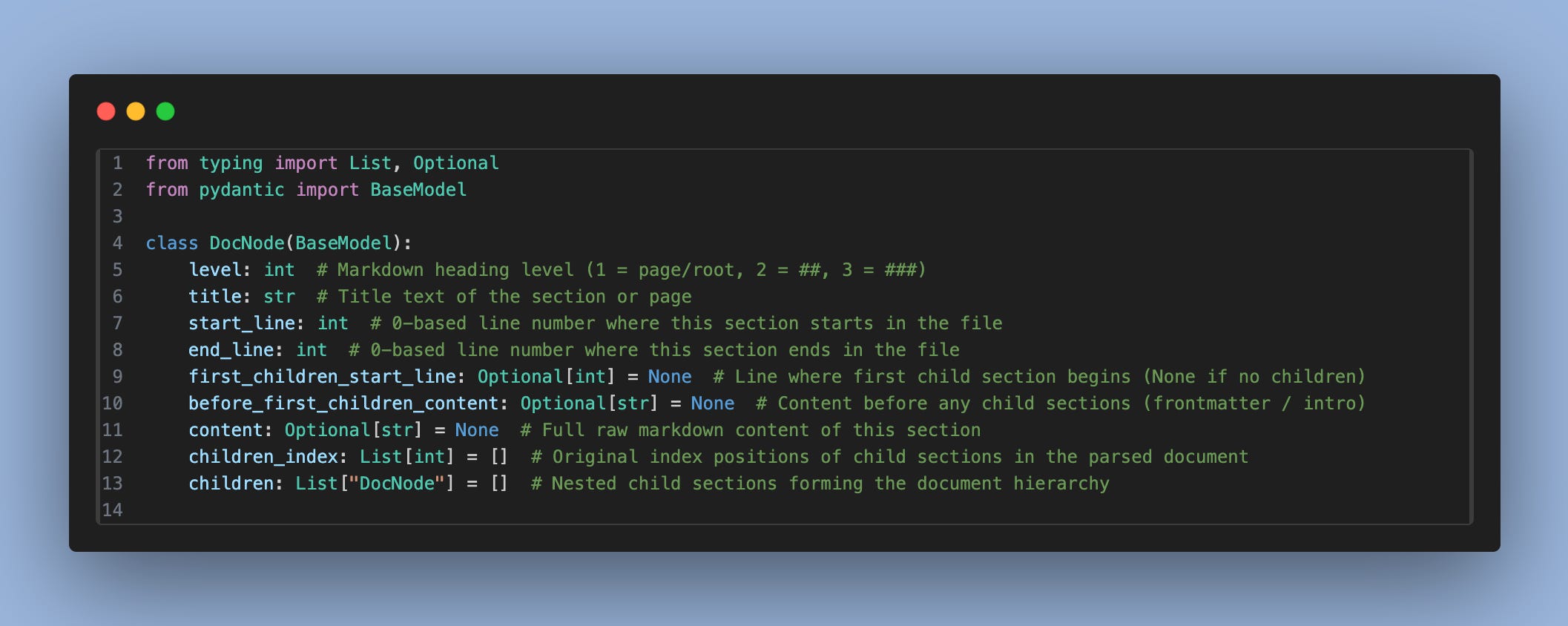
This is how the indexing will look like
Now we are ready to start building our first agent, “Documentation Change Analyzer”
Documentation Change Analyzer
Let’s revisit the list of initial problems we identified. This particular agent is responsible for addressing the second one: “What specific lines or sections were changed within each file?” and “How should the identified changes be translated?”
At a basic level, this can be achieved using Git by identifying the exact lines that were modified. However, there’s an important design consideration here.
While it’s technically possible to translate only the modified lines into the new language, doing so makes it much harder later to determine which parts of the corresponding documentation files should be removed or replaced. Line-level translation alone loses structural context.
To avoid this issue, instead of focusing on individual lines, we identify which section of the document has changed. This is done using the indexing logic we designed earlier. By working at the section level, downstream agents have a much clearer understanding of where changes belong and what needs to be updated or removed.
Conceptually, the indexing tree of a page looks like this:
Root (Page)
 └── Heading: Root Section
     └── Content: root content
         ├── Heading: Child Section 1
         │    └── Content: child content 1
         │        ├── Heading: Child Section 1.1
         │        │    └── Content: child child content 2
         │
         └── Heading: Child Section 2
              └── Content: child content 2
By associating each change with a node in the document tree, we retain the structural context of the content. This makes translations, deletions, and updates across other language repositories significantly more reliable and deterministic, since matching corresponding headings in parallel documentation becomes straightforward.
Through this approach, I identified three distinct scenarios under which changes can occur:
Case 1: Change in Parent Pre-Child Content
When modifications occur only before the first child section, only the parent’s pre-child content is updated. All child sections remain unchanged.
Case 2: Change Within a Child Section
When content inside a specific child section is modified, only that child section is updated. The parent section and other child sections are unaffected.
Case 3: Change in Parent Content (Fallback Case)
When parent-level content changes outside the pre-child area, the entire parent section is updated, including all of its child sections.
To determine which case applies, a set of rule-based checks is used. These rules are implemented in the codebase of the tool leveraged by this agent to accurately classify each change.
Below is a sample output produced by the branch change analyzer agent:
[
  {
    "level": 1 / 2 / 3 / 4,
    "title": "Title or heading of the modified section",
    "context": "Updated content",
    "full_context_flag": true / false
  }
]

level: The hierarchy level of the modified section (Title, Subtitle, Heading, or Subheading)

title: The text of the section heading

context: The updated content within that section

full_context_flag: Indicates whether only part of the section changed or the entire section was modified
Let’s pause and think this through. By combining the level and title, we can precisely identify which section needs to be updated. The full_context_flag then tells us whether the entire section should be modified or only the content before the first child.
However, there’s a critical edge case this approach initially misses. If a new child or sub-child section is added, the entire system can break because the existing indexing no longer aligns with the document structure. This is exactly where the index_mapping_specialist and index_mapping_fixer agents come into play.
I discovered this issue only after building the other three agents and had to retrofit the solution. These two agents ensure that when the documentation_change_analyzer runs, it doesn’t fail due to this structural mismatch and can safely handle newly introduced sections.
you can find more concrete implementation here.
Let’s go and try to build “Korean Translator Agent” and “Portuguese (Brazil) Translator agent”.
Korean Translator Agent / Portuguese (Brazil) Translator Agent
Both agents operate in essentially the same way; the only distinction is that one translates content into Korean, while the other translates it into Portuguese (Brazil).
Together, they address two key problems: identifying the corresponding files in the other-language documentation repositories and determining exactly where the translated content should be applied in the mapped files—whether content needs to be added, updated, or removed.
The first problem is relatively straightforward. Most repositories follow consistent file-naming conventions across languages, so there is no need to discover new filenames. Instead, we simply update the directory path, which can be handled programmatically by replacing the directory name.
The next challenge is locating the exact section that needs to be modified. For this, we reuse the indexing logic built at the very beginning. Using the levels provided by the Documentation Change Analyzer agent, we filter the relevant sections. Here, we apply a subset of the original logic and present the resulting structure in a clear, LLM-friendly format, such as:
Overview (Level: 2, lines 7–10)
Installation (Level: 2, lines 11–18)
Basic Usage (Level: 2, lines 19–46)
Complete Working Example (Level: 2, lines 47–184)
Tool Parameters (Level: 2, lines 185–202)
Advanced Filtering (Level: 2, lines 203–257)
Search Parameters (Level: 2, lines 258–264)
Return Format (Level: 2, lines 265–280)
Default Embedding (Level: 2, lines 281–285)
Custom Embeddings (Level: 2, lines 286–328)
Error Handling (Level: 2, lines 329–335)
Environment Variables (Level: 2, lines 336–342)
From the previous agent, we already know the title of the section that changed (which must be one of the sections listed above), the updated content, and whether the change is a complete replacement or a partial update before the first child section. Using this information, the second tool combines the earlier agent context with the indexed section data to determine precisely which section was modified.
The agent then produces a structured JSON output that specifies the required updates for the translated files, for example:
[
  {
    "FILE_PATH": "file_path_1",
    "CONTENT_TO_BE_DELETED_START_LINE": -1,
    "CONTENT_TO_BE_DELETED_END_LINE": -1,
    "NEW_CONTENT": "Korean translation of the Configuration Steps section content..."
  },
  {
    "FILE_PATH": "file_path_2",
    "CONTENT_TO_BE_DELETED_START_LINE": -1,
    "CONTENT_TO_BE_DELETED_END_LINE": -1,
    "NEW_CONTENT": "Korean translation of the What is Crew Studio section content..."
  },
]

Where:

FILE_PATH identifies the file to be updated
CONTENT_TO_BE_DELETED_START_LINE indicates the starting line number of content to remove
CONTENT_TO_BE_DELETED_END_LINE indicates the ending line number of content to remove
NEW_CONTENT contains the translated content that should be inserted
you can find more concrete implementation here.
Now let’s try to create the “File Content Editor and Git Commit Agent”
File Content Editor and Git Commit Agent
This component is fairly straightforward. It consumes context from both the Korean Translator Agent and the Portuguese (Brazil) Translator Agent, and operates using two tools: the file editor tool and the git commit tool.
There is no additional reasoning or decision-making involved at this stage. To understand the implementation details, it’s best to directly review the code.
Now let’s address a key problem we identified in the documentation change analyzer agent. When a new section is added, it disrupts the entire indexing logic, which in turn breaks the workflow of all downstream agents.
To make the system robust, we need a way to detect and reconcile these structural changes so that index-based assumptions remain valid and the rest of the agent pipeline continues to function correctly, even when new sections are introduced.
Index Mapping Specialist / Index Mapping Fixer
This agent’s responsibility is well defined: detect whether any new section has been added to the English documentation and ensure that the same section exists in the corresponding Korean and Portuguese (Brazil) documentation.
To achieve this, we reuse the indexing logic to extract and compare the structural indexes of all three files—English, Korean, and Portuguese (Brazil). The tool outputs a normalized list of headings along with their hierarchy levels and line ranges, for example:
Overview (Level: 2, lines 7–10)
Installation (Level: 2, lines 11–18)
Basic Usage (Level: 2, lines 19–46)
Complete Working Example (Level: 2, lines 47–184)
Tool Parameters (Level: 2, lines 185–202)
Advanced Filtering (Level: 2, lines 203–257)
Search Parameters (Level: 2, lines 258–264)
Return Format (Level: 2, lines 265–280)
Default Embedding (Level: 2, lines 281–285)
Custom Embeddings (Level: 2, lines 286–328)
Error Handling (Level: 2, lines 329–335)
Environment Variables (Level: 2, lines 336–342)
Using this indexed representation, the LLM is tasked with identifying any missing headings in the non-English files and determining exactly where those headings should be inserted.
The output of this agent follows a structured JSON format like below:
[
  {
    "FILE_PATH": "file_path_1",
    "PREVIOUS_SECTION": "Previous Section",
    "PREVIOUS_SECTION_START_LINE": 123,
    "PREVIOUS_SECTION_END_LINE": 145,
    "NEXT_SECTION": "Next Section",
    "NEXT_SECTION_START_LINE": 146,
    "NEXT_SECTION_END_LINE": 180,
    "NEW_HEADING_TRANSLATED": "Translated heading in Korean or Portuguese (Brazil)",
    "LEVEL": 2,
    "REASON": "Explanation of how the insertion point was determined using the surrounding sections and their line ranges"
  }
]


FILE_PATH: The documentation file that needs to be updated
PREVIOUS_SECTION: The section that appears immediately before the missing heading
PREVIOUS_SECTION_START_LINE / END_LINE: Line range of the previous section
NEXT_SECTION: The section that follows the missing heading
NEXT_SECTION_START_LINE / END_LINE: Line range of the next section
NEW_HEADING_TRANSLATED: The translated heading text (Korean or Portuguese (Brazil) only—no English)
LEVEL: Heading level (1/2/3/4)
REASON: A clear justification describing how the insertion position was derived from the surrounding sections
This output precisely captures what section is missing and where it belongs. It is then passed to the index_fixer_agent, which has read–write access to the repository. The index fixer updates the file structure accordingly, ensuring that downstream agents—especially the documentation change analyzer—operate on a consistent and correct index without failure.
Async Processing Across Changed Files
So far, we’ve focused on the scenario where a single file is changed and ensured that the agents and the overall agentic flow behave correctly. The next smart optimization is to scale this approach when multiple files are modified.
When n files change, we can spin up n independent crews—one per file—and run them in parallel. This significantly increases throughput and reduces overall turnaround time (TAT).
CrewAI supports this pattern through the kickoff_for_each_async functionality, which allows multiple crews to be executed concurrently for a collection of inputs.
You can read more about this feature here, and explore its implementation here.
Final Note
Feel free to reach out to me on my socials if you’d like to know more about this project.
Do subscribe to my Substack—I regularly share what I’m currently learning and building.
See you in the next one! 🚀